PowerShell Obfuscation & Anti-virus Evasion
High-level research into evading anti-virus detection through PowerShell obfuscation.
 Ryan Hunt8 min read— views
Introduction & Research
Anti-virus evasion through obfuscating involves the use of taking plain text commands and turning this text into non-human readable text. Modern attacks often leverage legitimate OS components, such as scripting interpreters through executing commands in formats that complicate inspection and detection.
PowerShell and obfuscation is relevant within anti-virus evasion techniques as PowerShell is primarily an administrative tool but has a wide range of capability. Security controls should distinguish legitimate use vs malicious use as blocking every instance of PowerShell is not a practical approach.
As mentioned, obfuscation alters the appeareance of commands or scripts while preserving the intended behavior or literal execution of the command/script. Some examples of obfuscation include encoding selected strings, splitting text into fragments, variable renaming, and dynamic expressions.
The MITRE ATT&CK framework documents command obfuscation as T1027.010 and associates the technique with impeding analysis & detection (MITRE ATT&CK, 2026).
The research attempts to solve the question of how selected benign PowerShell obfuscation techniques affect source-level readability; Microsoft Defender detections, and PowerShell Script Block Logging visibility. This research will focus on observability rather than confirming a harmless script evades malicious code detection.
PowerShell Obfuscation Techniques
PowerShell out of the box supports a variety of capabilities that allow commands and strings to be represented and understood in various formats while still preserving and executing the desired behavior. These capabilities do have legitimate use cases but on the contrary can also be leveraged by threat actors to obscure malicious behavior.
Base64 Encoding
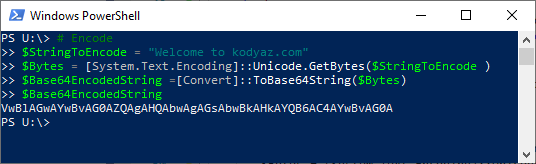
A common obfuscation technique involves the use of Base64 encoded data, which effectively represents Write-Host "Example" as V3JpdGUtSG9zdCAiRXhhbXBsZSI=, not very readable right? PowerShell supports the -EncodedCommand flag, which allows for Base64 text. Encoding the text does not encrypt the data, which means the process of encoding is a 2-way function, encode ↔ decode.
String Concatenation
Another technique of obfuscation is the action of concatenating strings into smaller fragments and reconstructing the full string at then point of execution. For example, Get-Process can be seperated into the following using string concatentation:
$a = 'Get'
$b = '-Process'
$command = $a + $b

& $command
# --- Execution -----
PS C:\Users\user> C:\Users\user\Downloads\string-concatenation.ps1

Handles  NPM(K)    PM(K)      WS(K)     CPU(s)     Id  SI ProcessName
-------  ------    -----      -----     ------     --  -- -----------
    207      13     3684      17164              9092   0 AggregatorHost
    232      20    23252      23460       0.45  11460   1 ai
While both techniques of execution perform the same outcome, string concatenation can complicate signature-based detections that rely on exact command strings.
Variable Obfuscation
Variable obfuscation is the action of replacing descriptive variables names such as $computerName with $x1, this is rather simple in nature but it makes it much more difficult to interpret. This is generally used in combination with other forms of obfuscation (Bohannan & Holmes, 2017).
Dynamic Expressions
Dynamic expression involves constructing strings or values at the point of execution rather than in the final form within the source code. For example, PowerShell’s -join flag combines multiple strings into a single string (Microsoft, 2025). This particuarly combats static analysis as the completed string does not directly appear in the original script.
Antivirus Detection & AMSI
Traditional anti-virus use signature-based detection to detect on known malicious activity within files and scripts, for example a malicious script used repeatedly will likely be detected quicker as its signature has been learned by anti-virus programs whereas a new, unused malicious script will likely not be caught by signature based detection. Obfuscation interferes with this process by changing the “text” representation of commands without affecting the end behavior. Modern endpoint security and anti-virus solutions do not solely rely on signature based detections and often employ behavior analysis and runtime inspection of files.
Microsoft’s Antimalware Scan Interface (AMSI) allows for supported applications (including PowerShell) to submit script content to AV providers for inspection, similar to VirusTotal. This is important as obfuscated PowerShell commands as content can be inspected after decoding or interpreter processing.
For example, a string within a script encoded using Base64 may be decoding at the point of execution, which is likely to expose additional content during inspection. AMSI improves visibility into techniques such as obfuscation, but it does not guarantee detection of malicious command execution (Microsoft, 2026).
PowerShell Script Block Logging
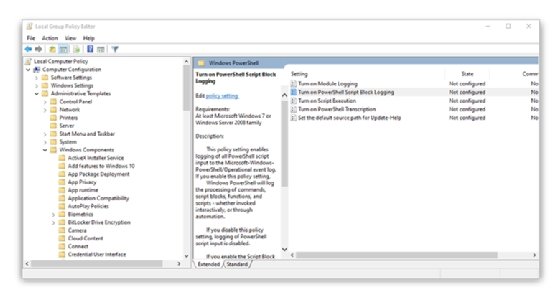
PowerShell Script Block Logging provides deeper visibility as it records script content processed within the PowerShell engine. Script Block Logging enables PowerShell to store event logs under Windows-PowerShell/Operational event log 4104 (Microsoft, 2025b).
These logs are useful in identifying and detection of suspicious PowerShell activity including obfuscated commands/scripts. Though, Script Block Logging simply provides additional visibility and is not a preventative control in itself.
This research will utilize Operational event log 4104 to compare the visibility of plaintext execution and obfuscated PowerShell scripts.
Real World Applicaiton & AV Evasion
PowerShell obfuscation has been utilized by multiple threat actors in real-world attacks; MITRE ATT&CK documented APT32’s use of the Invoke-Obfuscation framework which effectively disguises PowerShell commands. FIN-7 has documented usage of fragmented strings, environment variables, and character substitution in order to complicate and evade detection & analysis of malicious commands (MITRE ATT&CK, 2026).
From an offensive security perspective, the obfuscation technique is primarily used to “hide” or “disguise” malciious commmand appearance while still preserving their intended function. Obfuscation techniques allows for potential evasion of signature-based detection mechanisms that rely on identifying known malicious patterns. While signature-based detection is most likely to be evaded, addiitonal security controls and the complexity of the obfuscation should be considered when attempting evasion; modern endpoint detection and response (EDR) tools and AV programs often employ behavioral analysis, runtime inspection, AMSI, etc., which can successfully limit the effectiveness of obfuscation.
Live Testing and Demonstration
In this live testing demonstration, the purpose is to demonstrate PowerShell obfuscation techniques and how they affect script execution, AV detection, and security logging within a Windows environment. I leveraged 4 PS scripts to represent benign information gathering on a machine while demonstrating different obfuscation techniques. The demonstration focused on a baseline unobfuscated script, Base64 encoding, string concatenation, and variable obfuscation.
Lab Environment
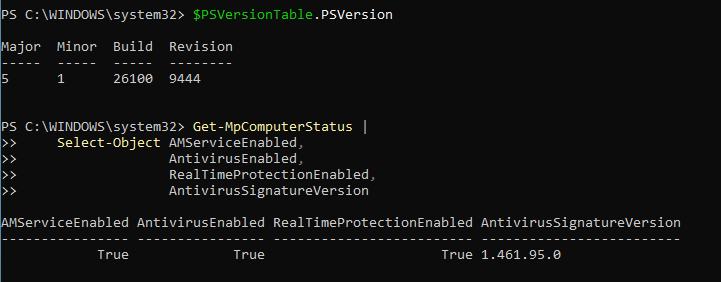
The research was conducted within a Windows 11 Pro virtual machine with Microsoft Defender and PowerShell Script Block Logging enabled.
Test 1 - Baseline PowerShell Execution
This first test executed baseline.ps1 which performed basic system reconnaissance using PowerShell commands. The script collected the following information: hostname, current user, operating system, and running processes.
The purpose of this file is to compare functionality and detection results of this baseline, unobfuscated script vs later obfuscation technique scripts.
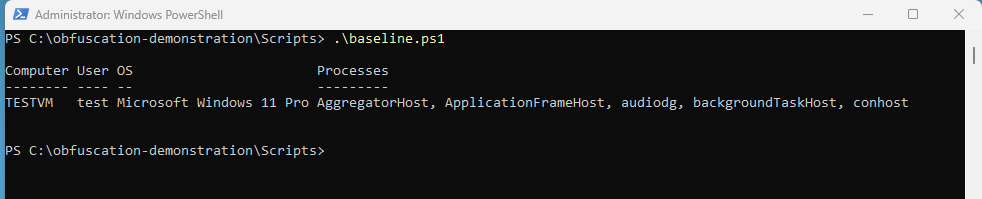
The baseline.ps1 file executed successfully and Microsoft Defender did not generate any detections for this activity.
Test 2 - Base64 Encoding
The second test used encoded.ps1, which utilized Base64 encoded strings that were later decoded during execution.
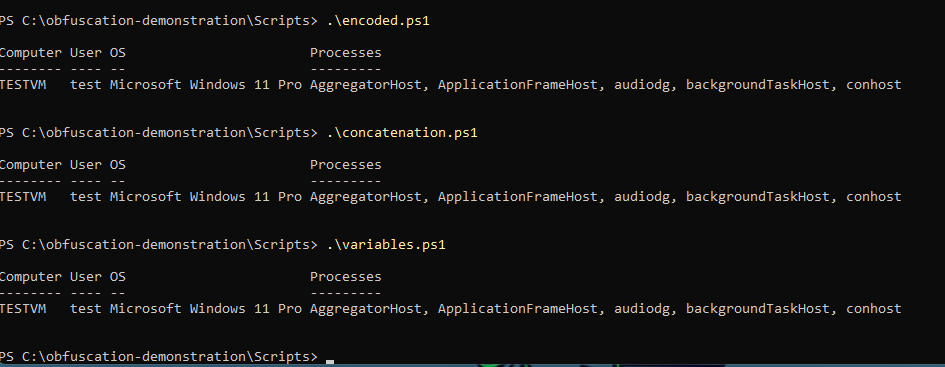
The encoded.ps1 file executed successfully and Microsoft Defender did not generate any detections for this activity.
Test 3 - String Concatenation
The concatenation.ps1 script demonstrates joining seperate strings into a complete command at the point of script execution.
This script executed successfully and did not generate any Defender detections.
Test 4 - Variable Obfuscation
The fourth and final test utilized variables.ps1, which used vague variable names/identifiers such as $a, $b, etc.
The script executed successfully and did not generate any Defender related alerts.
PowerShell Script Block Logging
Following execution of the test scripts, PowerShell Script Block Logging events 4104 were reviewed through Event Viewer; event 4104 and PowerShell terminal queries of the Event Viewer.
During initial review of the Event Viewer Operational Event ID 4104 logs, I did find logs of execution of each individual script, however only encoded.ps1 was logged with the full script contents, whereas other logs just showed the invocation of .\encoded.ps1, .variables.ps1.
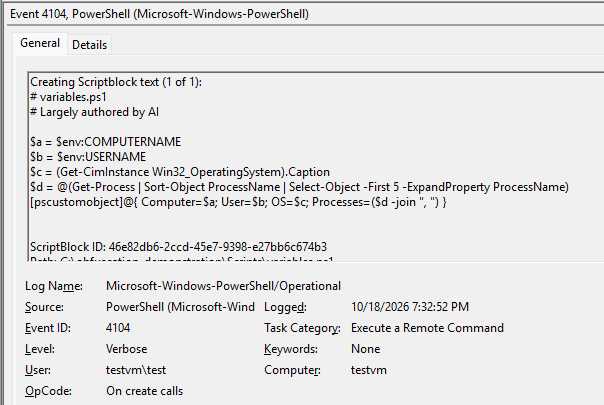
I was able to pull the full script block event logs for the remanining scripts however through the below PowerShell script.
Get-WinEvent -FilterHashtable @{
    LogName = "Microsoft-Windows-PowerShell/Operational"
    Id = 4104
} -MaxEvents 500 |
    Where-Object {
        $_.Message -match "Get-CimInstance|FromBase64String|LAB06"
    } |
    Select-Object TimeCreated, Message |
    Format-List
The Get-WinEvent PowerShell query effectively pulled full script block logging events for all script executions across all test scripts.
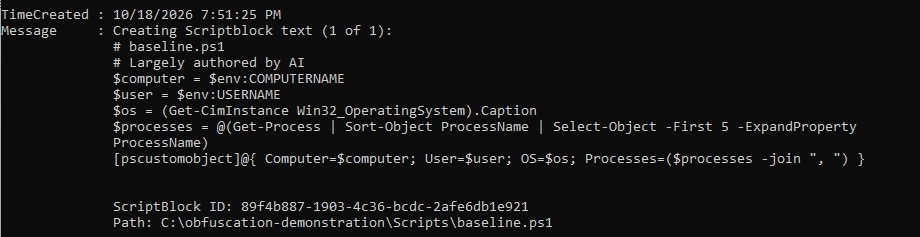
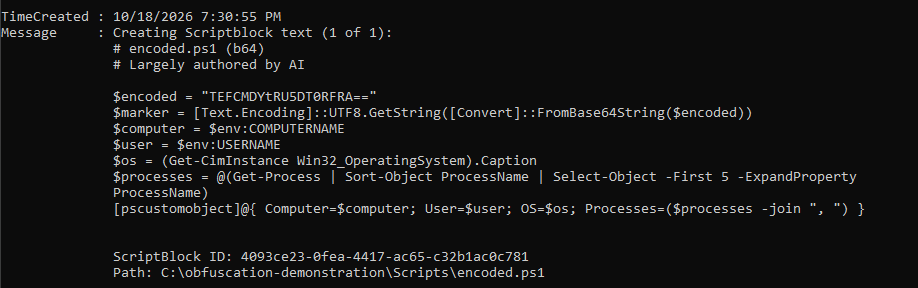
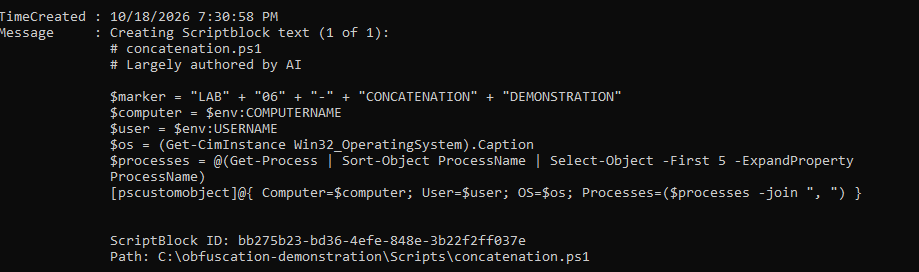
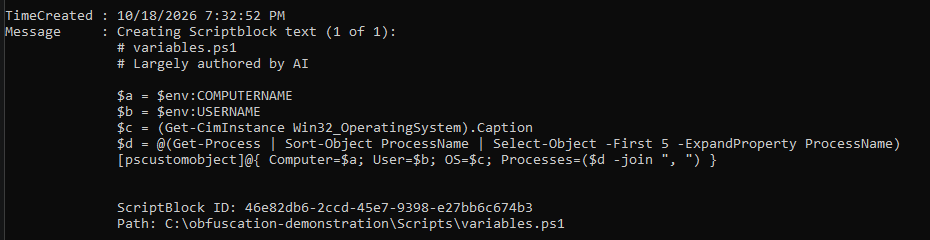
The results highlight that obfuscation through encoding, variable, and concatenation did not inherently prevent execution of these benign scripts, nor did it prevent logging of the core script content.
| Test | Execution | Defender detection | Event ID 4104 |
|---|---|---|---|
| Plaintext baseline | Success | No alert | Both |
| Base64 encoding | Success | No alert | Both |
| String concatenation | Success | No alert | Both |
| Variable obfuscation | Success | No alert | Both |
| AMSI positive control | Success | Detected | Both |
AMSI & Defender Results
An AMSI test was conducted using Microsoft’s official script for AMSI detection testing, through executing the following script we can confirm Defender is effectively scanning for threats and reporting correctly:
$testString = "AMSI Test Sample: " + "7e72c3ce-861b-4339-8740-0ac1484c1386"
Invoke-Expression $testString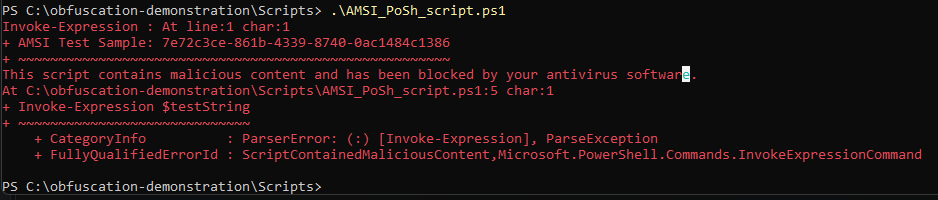
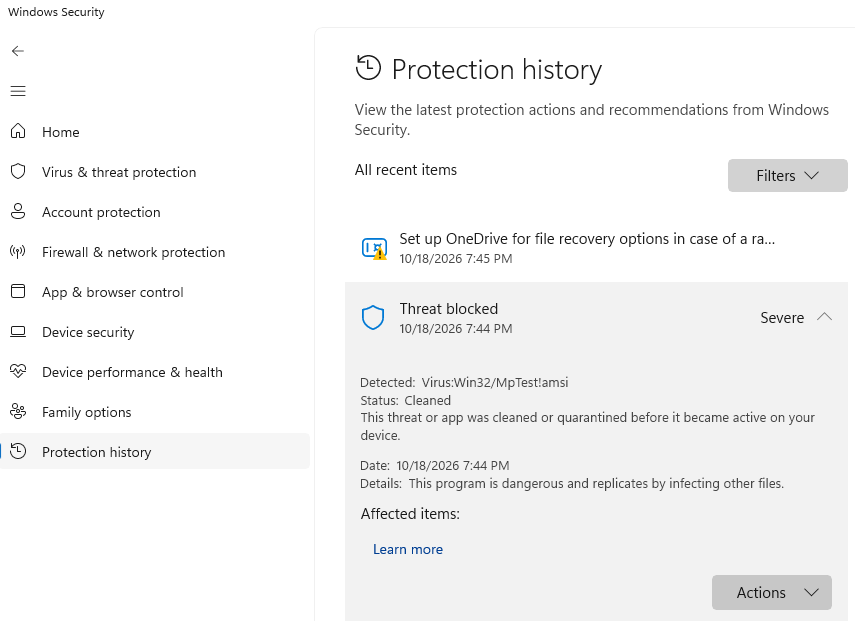
And verifying any existing Defender detections throughout the full testing process:
Results and Analysis
From the evidence we can conclude that the only Defender detection generated throughout execution of the test obfuscation scripts and AMSI check was the AMSI check itself, Defender did not detect or alert on any of the obfuscated command execution. Though Defender did not provide any initial detections; full visibility into script content was successful through script block logging which can provide additional detection and prevention controls, with that being said this experiment does not fully document a successful evasion.
References
Bohannon, D., & Holmes, L. (2017). Revoke-Obfuscation: PowerShell obfuscation detection using science [Conference white paper]. Black Hat USA 2017. https://blackhat.com/docs/us-17/thursday/us-17-Bohannon-Revoke-Obfuscation-PowerShell-Obfuscation-Detection-And%20Evasion-Using-Science-wp.pdf
Bohannon, D., & Holmes, L. (2017, July 28). Revoke-Obfuscation: PowerShell obfuscation detection using science. Mandiant. https://cloud.google.com/blog/topics/threat-intelligence/revoke-obfuscation-powershell/
Microsoft. (2024, July 23). about_PowerShell_exe. Microsoft Learn. https://learn.microsoft.com/en-us/powershell/module/microsoft.powershell.core/about/about_powershell_exe?view=powershell-5.1
Microsoft. (2025, September 30). about_Logging. Microsoft Learn. https://learn.microsoft.com/en-us/powershell/module/microsoft.powershell.core/about/about_logging
Microsoft. (n.d.). about_Join. Microsoft Learn. https://learn.microsoft.com/en-us/powershell/module/microsoft.powershell.core/about/about_join?view=powershell-5.1
Microsoft. (n.d.). Anti-malware Scan Interface (AMSI) integration with Microsoft Defender Antivirus. Microsoft Learn. https://learn.microsoft.com/en-us/defender-endpoint/amsi-on-mdav
Microsoft. (n.d.). AMSI demonstrations with Microsoft Defender for Endpoint. Microsoft Learn. https://learn.microsoft.com/en-us/defender-endpoint/mde-demonstration-amsi
MITRE ATT&CK. (2026, May 12). Obfuscated files or information: Command obfuscation (T1027.010). https://attack.mitre.org/techniques/T1027/010/